Change Grid3D_Gas_CONTROLS_Emitter > Emitter Summary > Simulation:
– Vorticity Confinement to 10
– Pressure Relaxation 0.95
– Density Dissipation 5
– Temperature Dissipation 5
– Density Bouyancy 1
– Temperature Bouyancy 0.1
Change Grid3D_Gas_CONTROLS_Emitter > Emitter Summary > Particle Source:
– Density Mult to 30
– Temperature Mult to 30
– Velocity Mult to 30
Change Grid3D_Gas_CONTROLS_Emitter > Emitter Summary > Render:
– Render Step Size Mult to 1
– Render Density Range to x=0, y=0.1
– Render Density Gain to 0.1
– Render Density Albedo to -0.8
– Render Temperature to Curve
– Render Temperature Range to x=0, y=0.01
– Render Temp Opacity Gain to 0.5
Set the colour ramp to look like the following screenshot:
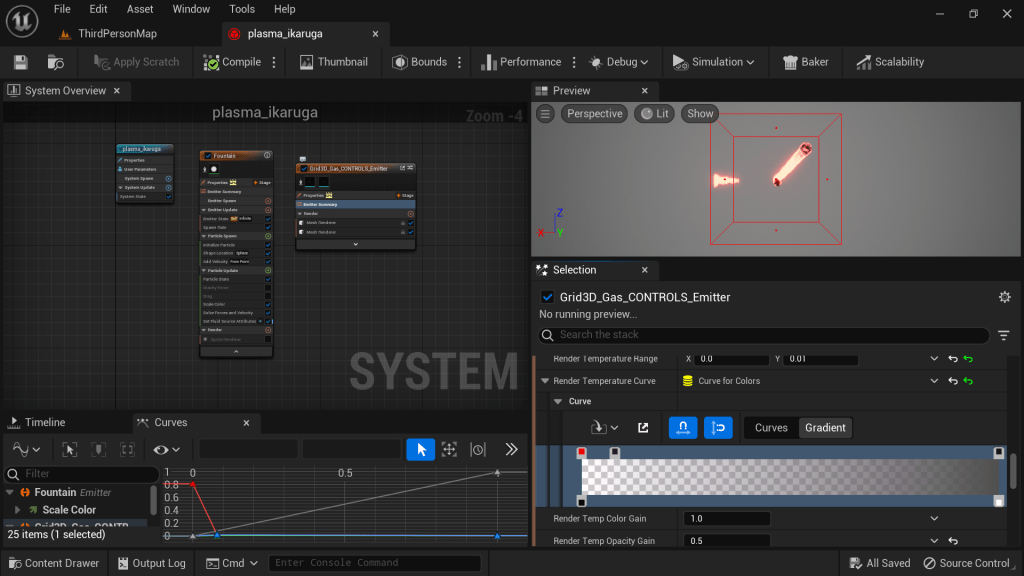
The left-most colour is red, the middle colour is very dark purple (not black!), and the right-most colour is black. The left opacity is 0.0, the right opacity is 1.0.
 Cowcow’s Graphics Tutorials
Leave a comment